Initialize NeuroAnalyzer
using NeuroAnalyzer
import CairoMakie
# Quarto sets a default figure size (672 × 480 px), which overrides the sizes of
# NeuroAnalyzer figures: remove it
delete!(CairoMakie.Makie.CURRENT_DEFAULT_THEME, :resolution)using NeuroAnalyzer
import CairoMakie
# Quarto sets a default figure size (672 × 480 px), which overrides the sizes of
# NeuroAnalyzer figures: remove it
delete!(CairoMakie.Makie.CURRENT_DEFAULT_THEME, :resolution)The Finger Tapping Test (FTT) is a simple neuropsychological test of motor speed and motor control: the subject taps a button (or a key) with the index finger as fast as possible for a fixed time. NeuroAnalyzer records the time of every tap and its duration (from press to release).
The test consists of trials trials of duration seconds, each followed by an interval of interval seconds. During the trials the subject taps as fast as possible; during the intervals the subject must not tap: taps made during the intervals are recorded separately, as a measure of motor inhibition.
There are two versions of the test:
iftt(): GUI mode, the test runs in a window,ftt(): CLI mode, the test runs in the terminal (e.g. on a Raspberry Pi without a display).Parameters:
duration: trial length in seconds (default: 20),trials: number of trials (default: 2),interval: length of the interval after each trial in seconds (default: 2; 0: no intervals),gpio: number of the GPIO pin the button is connected to (default: -1, keyboard),port_name: serial port of the button panel (default: "", no serial port).Input devices:
| Device | iftt() |
ftt() |
Settings |
|---|---|---|---|
| keyboard SPACEBAR | yes | yes | default |
| button on a Raspberry Pi GPIO pin | yes | gpio |
|
| button panel connected via USB (serial) | yes | yes | port_name and gpio |
If the button cannot be used (e.g. the serial port is not available, or pigpiod is not running), the keyboard SPACEBAR is used.
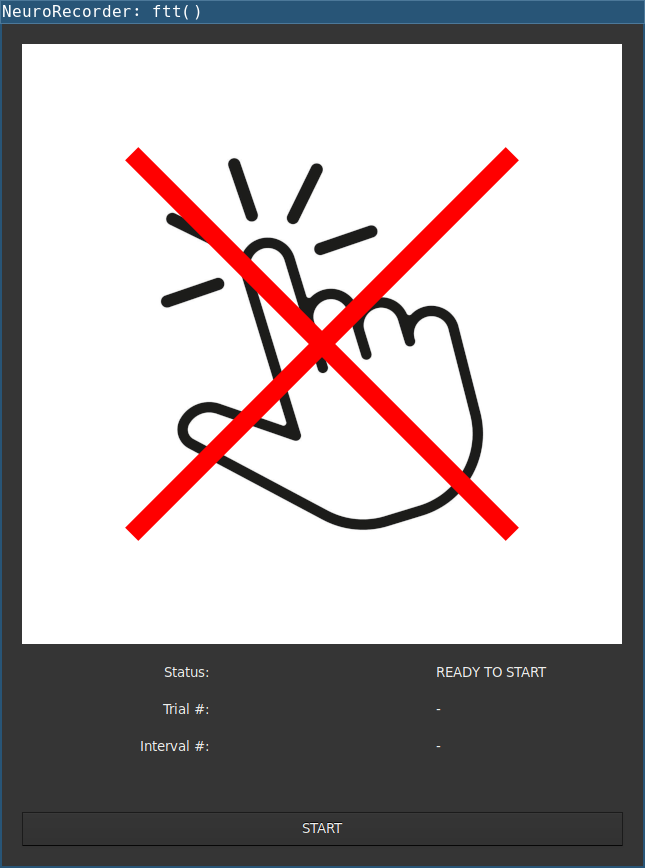
t = iftt(; duration = 10, trials = 6, interval = 5)The window shows the status and the number of the current trial and interval. Before the test and during the intervals the finger is crossed out (do not tap). Press START to begin; each trial starts after a beep.
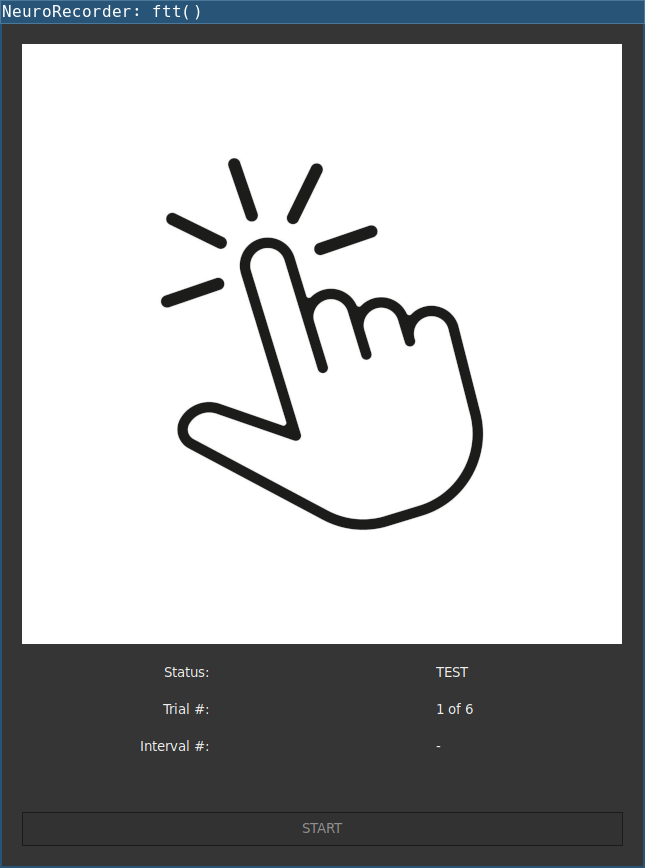
During a trial, the image shows a tapping finger:
If the window is closed before the end of the test, the completed trials are returned.
t = ftt(; duration = 10, trials = 6, interval = 5)NeuroTester: FTT
================
Trials: 6
Duration: 10 [seconds]
Interval: 5 [seconds]
Button: SPACEBAR
Ready to start - press the SPACEBAR to begin
The test will start after a beep
Trial 1: press the SPACEBAR as quickly as possible
Interval 1: DO NOT press the SPACEBAR
...
Trial 6: press the SPACEBAR as quickly as possible
Interval 6: DO NOT press the SPACEBAR
Testing completedNote: in the terminal, only key presses (not releases) are available: with the keyboard, ftt() records the tap times, and all tap durations are set to 100 ms. iftt() and the buttons record both.
Both functions return a named tuple:
| Field | Description |
|---|---|
taps |
number of taps in each trial |
tap_t |
tap times in each trial [ms] |
tap_d |
tap durations in each trial [ms] |
taps_int |
number of taps in each interval |
tap_t_int |
tap times in each interval [ms] |
tap_d_int |
tap durations in each interval [ms] |
All times are relative to the start of the trial or interval.
ftt_analyze() summarizes the inter-tap intervals (ITI, the time between successive taps within a trial):
n: total number of taps in all trials,t_mean, t_median: mean and median ITI [ms],t_rmssd: root mean square of successive differences between ITIs [ms] (tapping regularity),t_sdsd: standard deviation of successive differences between ITIs [ms].Example (results of a simulated test: 2 trials of 5 s, a tap every 170-200 ms):
# simulated tap times: 2 trials, ITI 170-200 ms
iti = [170 + 15 * (1 + sin(k)) for k in 1:25]
tap_t = [cumsum(iti), cumsum(reverse(iti))]
tap_d = [fill(80.0, 25), fill(85.0, 25)]
t = (taps = [25, 25],
     tap_t = tap_t,
     tap_d = tap_d,
     taps_int = [0, 1],
     tap_t_int = [Float64[], [1250.0]],
     tap_d_int = [Float64[], [60.0]])
r = ftt_analyze(t)
println("number of taps: ", r.n)
println("ITI mean: ", round(r.t_mean; digits = 1), " ms")
println("ITI median: ", round(r.t_median; digits = 1), " ms")
println("ITI RMSSD: ", round(r.t_rmssd; digits = 1), " ms")
println("ITI SDSD: ", round(r.t_sdsd; digits = 1), " ms")
println("taps during intervals: ", sum(t.taps_int))
number of taps: 50
ITI mean: 184.7 ms
ITI median: 184.9 ms
ITI RMSSD: 10.1 ms
ITI SDSD: 10.2 ms
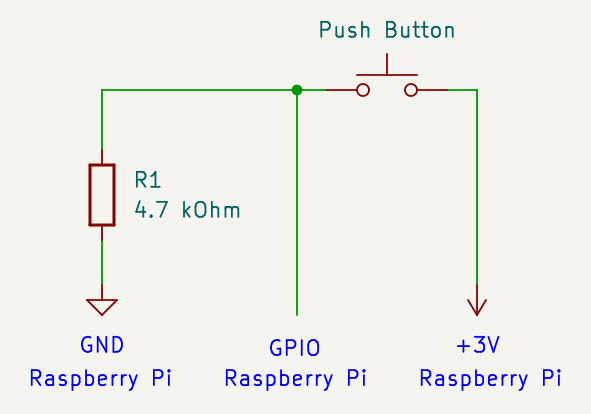
taps during intervals: 1With ftt() running on a Raspberry Pi, the button can be connected directly to a GPIO pin. The pin is given by its GPIO number (e.g. GPIO 23 is board pin 16). The pin is read via the pigpiod daemon:
sudo apt install pigpio-tools
sudo systemctl enable pigpiod
sudo systemctl start pigpiod
t = ftt(; duration = 10, trials = 6, interval = 5, gpio = 23)NeuroTester: FTT
================
Trials: 6
Duration: 10 [seconds]
Interval: 5 [seconds]
Button: RPi GPIO 23
Ready to start - press the BUTTON to begin
...State changes shorter than 50 ms are ignored (debouncing). A Raspberry Pi 4 or newer is recommended (NeuroAnalyzer needs a lot of memory).
Tip: to use a USB keyboard attached to the Raspberry Pi instead of the button, use the default gpio = -1.
Tip: running NeuroAnalyzer on a Raspberry Pi via ssh requires a virtual framebuffer:
DISPLAY=:0 xvfb-run -a -s '-screen 0 1024x768x24' juliaThe following error:
%%%%%%%%%%%%%%%%%%%%%%%%%%%%%%%%%%%%%%%%%%%%%%%%%%%%%%%%%%%%
Can't connect to pigpio at localhost:8888
Did you start the pigpio daemon? E.g. sudo pigpiod
...
%%%%%%%%%%%%%%%%%%%%%%%%%%%%%%%%%%%%%%%%%%%%%%%%%%%%%%%%%%%%
means that pigpiod is not running; start it with sudo pigpiod (in the Julia REPL, press ; to open the shell mode).
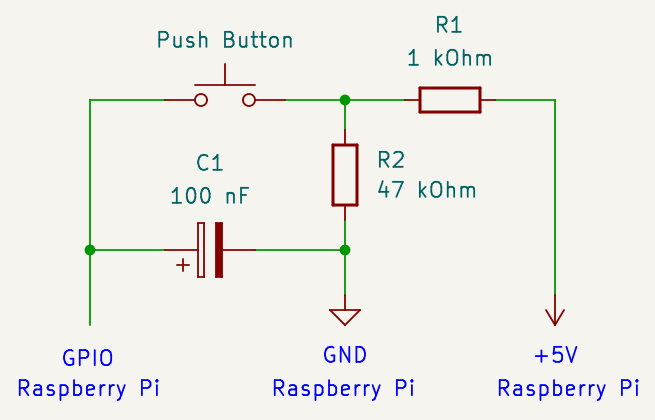
A mechanical button “bounces”: a single press produces several fast state changes. Besides the debouncing in software (50 ms), one of these circuits may be used when connecting the button to a Raspberry Pi: